A Saber productISO 27001 certified


For claimant firms, CMCs & funders
Consider your
claim inbox handled.
Claim Inbox automates the email and document work behind a claim: inbound correspondence, complex evidence gathering and case data entry. Your team approves each action, inside the case management system you already run.
What firms running Claim Inbox are seeing
- Less handling time
- 96%
- Same-team capacity
- 27×
- Extraction accuracy
- 99%+





Your team spends its day on
case admin.
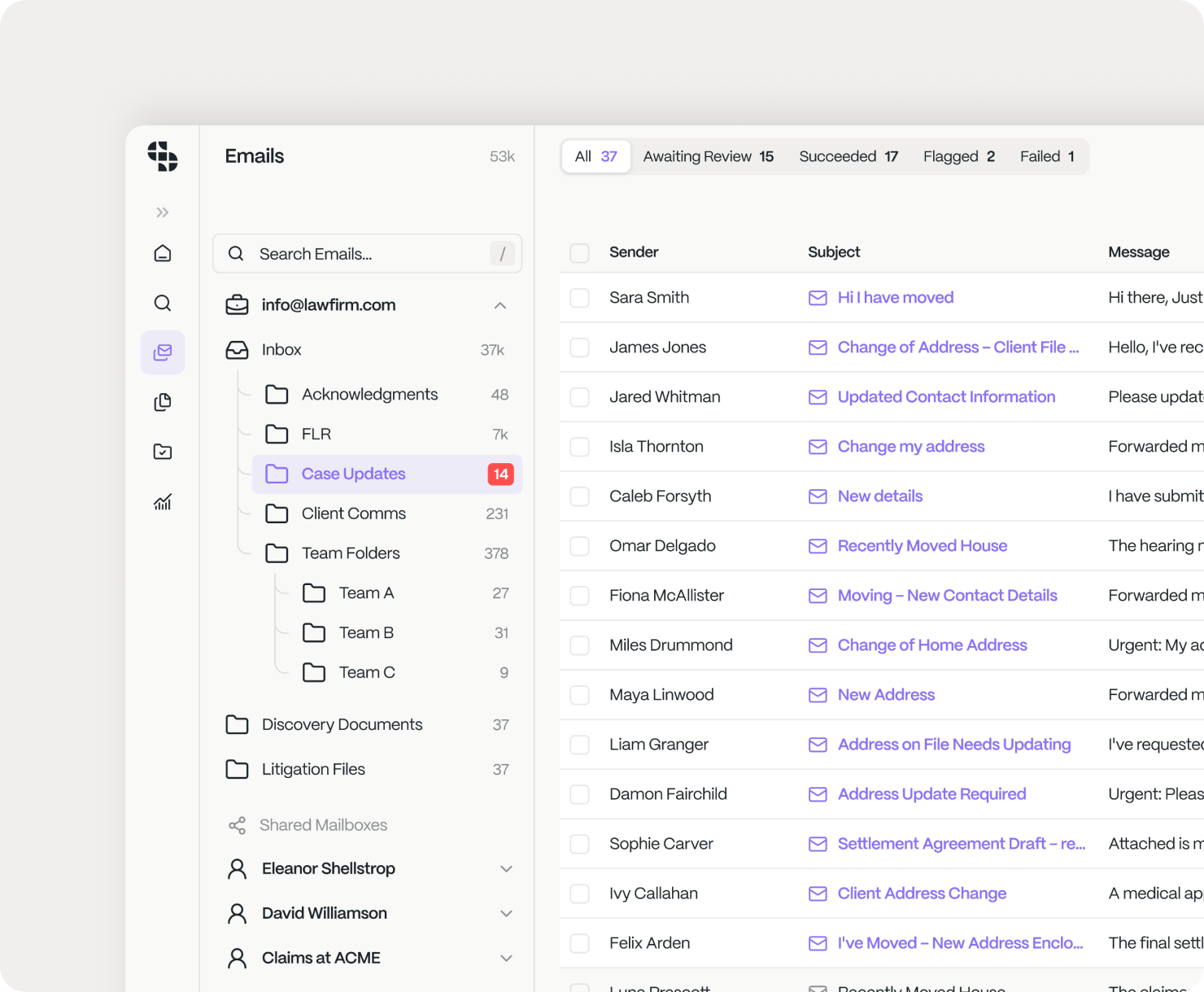
Correspondence arrives faster than anyone can process it. A paralegal opens the shared inbox (or a piece of post), works out which case it applies to and what actions to take, then processes that item across your case management system, SharePoint, an e‑signature platform and many others.
A few minutes on an LOC acknowledgement email; the better part of a day on an 800‑page DSAR or medical record.
Every item crosses five systems
Re‑keyed into the CMS, filed in SharePoint, sent for e‑signature, logged in a spreadsheet. Most of the minutes aren’t the judgement; they’re the moving between systems.
The queue has no owner
Your CMS knows the state of each case. It doesn’t know what’s still sitting in a shared inbox or the post tray, so nobody sees the real backlog until a client rings.
The backlog is frozen revenue
Cleared‑but‑unbilled and pending‑but‑billable work sits in a queue, and your funder is measuring how long it sits there.
Hiring is the usual answer. It’s linear, retention is falling, and by the time a new starter is productive the volume has moved again.
Manual Case Processing Workflow
A paralegal
- Opens the shared inbox
- Reads the email
- Extract the reference
- Find the case in the CMS
- Open the correct matter
- Figure out what to update
- Upload email and update CMS appropriately
- Reply to the email
AI suggests. A human decides.
The action fires automatically.
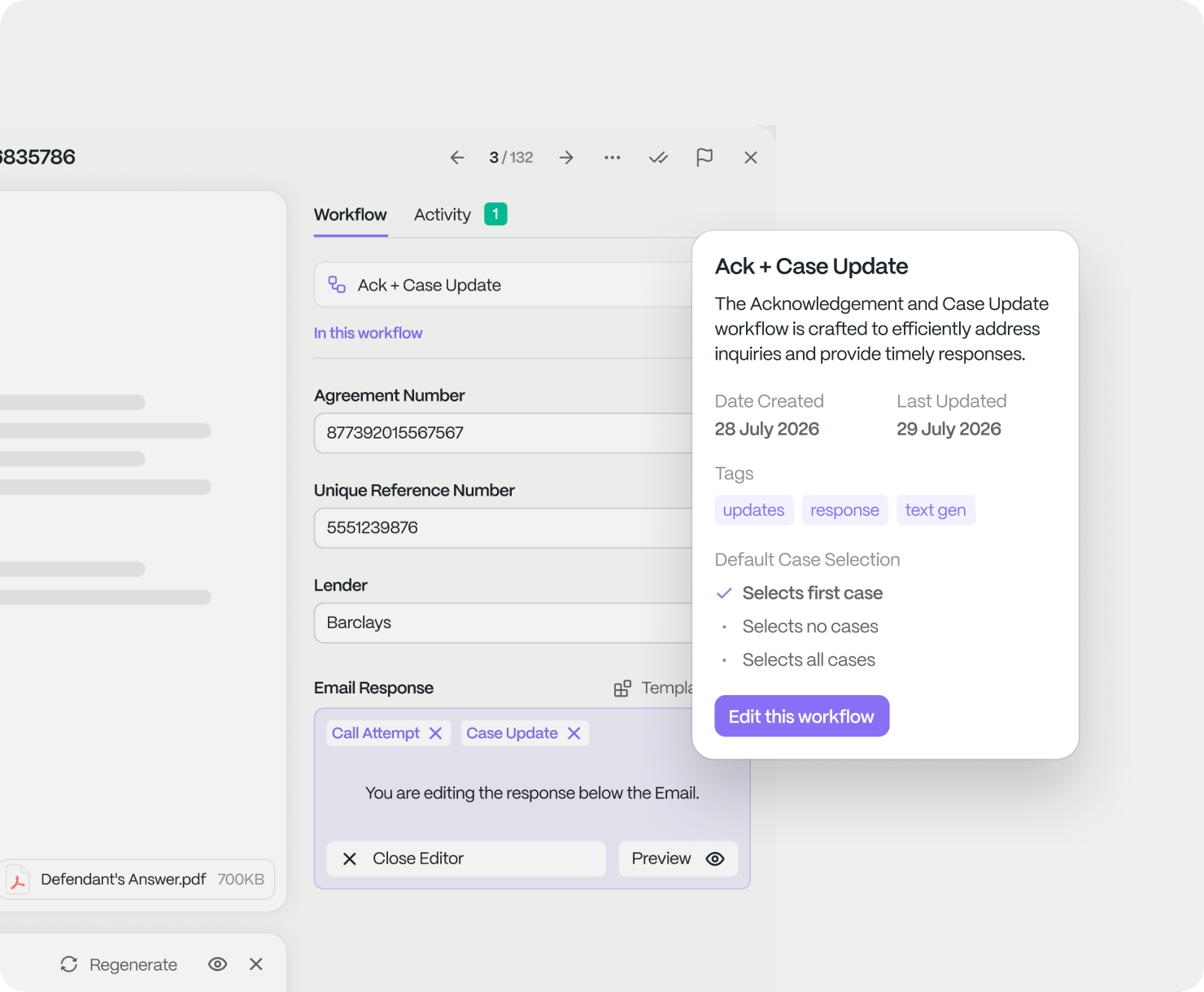
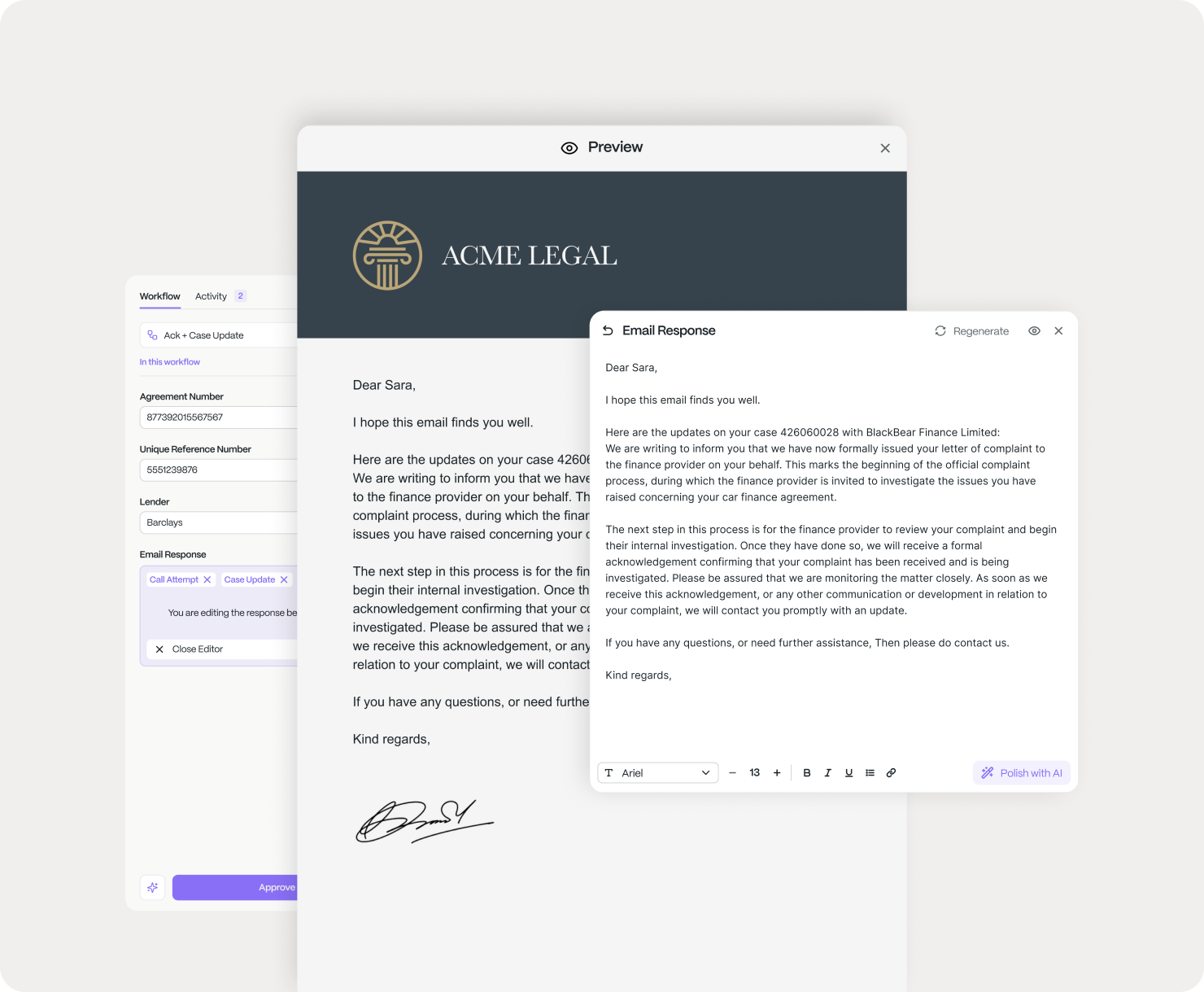
Claim Inbox isn’t a case management system, and it won’t replace yours. It sits around the systems you already run, reads the inbound work, and prepares each item as a ready‑to‑approve action. Once you approve, it handles the work itself.
- No black box.
- Automated, not autonomous.
- Live on your book in four weeks.
- Medical docs
- DSARs
- Emails
- CSV
- Queries

Approves
Why Claim Inbox
Existing workflows
don’t scale to thousands of claims.
Existing workflows only exist in one system, like your CMS. The work starts in the inbox and lives between many systems, where existing workflows can’t reach.
The existing way
Paralegals working a shared inbox, on top of a rigid CMS
Read, re-key and reconcile across the inbox, the CMS and a spreadsheet
A document changes and it makes your workflow outdated
Every new claim type is a fresh build
No single view of the real backlog
Scaling means scaling headcount
The Claim Inbox way
One layer around your CMS, human‑in‑the‑loop
Claim Inbox reads and writes back; a person approves every action
Experts at integrating with legacy systems
100% of items handled consistently, with a full audit trail
New claim types configured in weeks, not rebuilt
A live view of the queue, the backlog and the economics
Scale to millions without scaling headcount
Build vs buy: Building in‑house instead of using Saber
Four weeks, not four quarters
You’re live on your book in four weeks, on a platform already in production and having processed 5M+ cases. A build‑it‑yourself v1 starts at zero and takes quarters to reach accuracy you can trust.
Internal AI builds can’t do this
Reading scanned, handwritten DSARs and medical records at 99%+ accuracy, wiring it into your CMS and holding ISO 27001 is a software company’s full‑time job, not a side project for your IT team.
The target keeps moving
Every lender format or rule change leaves a home‑built workflow stale, the same trap as the existing way. Saber absorbs it, reconfigured in the no‑code builder, not rebuilt by you.
What it does
Six capabilities.
One canvas.
From the first inbound document to the whole book, each capability is a block in the Saber Workflow Builder. Snap them into an end‑to‑end flow for any claim type (no code) and reconfigure it the moment a document, rule or funder requirement changes.
Document Intelligence
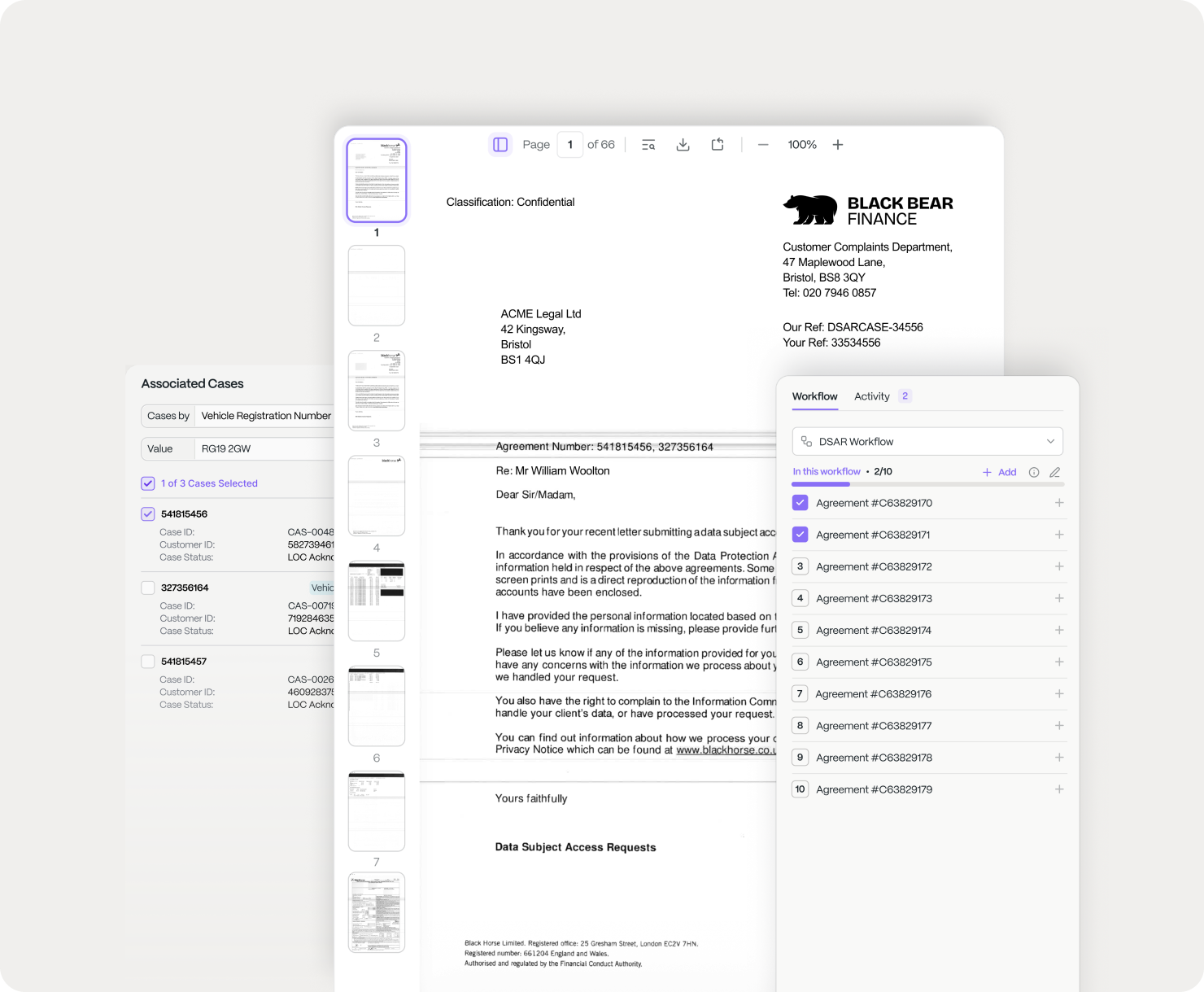
Reads DSARs, medical records and multi‑agreement PDFs (handwritten, scanned or two hundred pages) and extracts structured data anchored to the source page.
Learn more: Document IntelligenceCorrespondence Processing
Every inbound email and letter classified, matched to a case and routed (acknowledgements, LOC responses, chases) before anyone opens the inbox.
Learn more: Correspondence ProcessingClient Communications
Reply to each client faster, and in more relevant ways: the right response drafted for every case, with a person approving what goes out.
Learn more: Client CommunicationsClaim Intelligence
Applies a consistent decision to every claim (eligibility and next step), grounded in Financial Ombudsman upheld outcomes and your own historic case data. Precedent‑aware, not guesswork.
Learn more: Claim IntelligenceParalegal Performance
Full oversight of the team (who’s working what, how fast, and the quality of the output) so you manage by evidence, not gut feel.
Learn more: Paralegal PerformanceBook Intelligence
Real‑time data surfaced from every system for ops leaders and funders: how each tranche is performing, which defendant to chase, and where the book is stuck at a bottleneck.
Learn more: Book Intelligence
Build the flow once per claim type; run it on every case. The builder is what turns six capabilities into one operation, and what your ops team edits themselves, in minutes, without waiting on engineers.
The ROI calculator
Build your back office.
Watch the hours come back.
Set your case volume and how long a case takes your team today, then switch on the capabilities you’d run. Each one automates more of your operation, up to 80%. Have a play.
ROI Summary
- Hours saved / month
- 7,200
- Monthly capacity recovered
- £144,000
On a DBA, that’s margin back on every case: more cases through the same team, no new hires. Saber layers on top of the automation you already run.
On a CFA, that’s recoverable capacity: more cases through the same team, no new hires. Saber layers on top of the automation you already run.
Illustrative, at £20/hour on a 160‑hour FTE month; adjust to your own loaded cost. Each capability’s share of the automation is indicative.
Case study
Proven at
group-litigation scale.
A UK group litigation firm running PCP claims runs its correspondence through Claim Inbox with the same team: the work that once needed a paralegal army. It went on top of the firm’s existing automated CMS, not a greenfield build, which is why “we already have automation” isn’t a blocker. Verified; client anonymised.
- Less handling time
- 96%
- Same-team capacity
- 27×
- Extraction accuracy
- 99%+
- Live on your book
- 4 weeks
As seen on

 Manchester AI firm reaches £13m ARR without a sales team
 Sabermine passes five million cases in under three years
Automation maturity
You stay in control at every step.
Move up the ladder at your pace. Humans always set the rules and audit the work; automation earns trust, it isn’t assumed.
- ManualOrder of arrival“We work items in the order they land in the inbox.”
- TriagedRight cases first“Claim Inbox surfaces urgent work first.”
- Most clientsAI-assistedSuggest & Approve“It suggests the next action; a person approves.”
- SupervisedRoutine automated“It completes routine items; people handle exceptions.”
- GuardrailedAudited automation“It runs clear‑cut items within rules; humans audit a sample.”
You set the autonomy per workflow and move up only as fast as your risk appetite allows.
Frequently asked questions
Questions group
litigation teams ask.
How fast can you be live on our correspondence?
Four weeks. Our engineers configure Claim Inbox to your claim type and connect your case management; a proof of concept runs real volume on your data before you commit to anything.
Do you replace our case management system?
No. Claim Inbox sits around the systems you already run (Proclaim, Clio, Leap, Visualfiles and the rest), reading the inbound work and writing back to the case once a person approves. No migration, no rip‑and‑replace.
Can you handle DSARs and image-based PDFs?
Yes. Document Intelligence reads scanned, handwritten and image‑based bundles (DSARs, medical and service records, multi‑agreement PDFs running to hundreds of pages) at 99%+ extraction accuracy, every field anchored to its source page.
How do you satisfy the SRA and our funders on compliance?
A person approves every action, every action is logged in a full audit trail with page‑anchored citations, and we are ISO 27001 certified with UK‑only data residency.
How is this different from a legal AI copilot like Harvey?
A copilot helps a lawyer draft and research. Claim Inbox runs the operational back office of a claims book (reading inbound work, matching it to cases and preparing each action across your systems) at the volume of thousands of claims.
Why is Saber better than an AI agent?
An autonomous agent decides and acts on its own. Claim Inbox is automated, not autonomous: it prepares every action, a person approves it, and each step is configured per claim type in a no‑code builder you can audit.
Is our claimant data used to train your AI?
No. We never use your data, your clients’ data or your documents to train our models. It stays in the UK, under your retention rules.
Automate your book
with Saber.
Speak with us about your workflows: DSARs, medical records, a batch of defendant mail, a round of client updates. By the end of the week we’ll show you a demo relevant to your use case. No fee, no commitment.
AI suggests. A human decides.
Claim Inbox handles the rest.


